
Download Agribroker – commodity prices, forex rates, agricultural trading, crop forecasts, agribusiness tools, price alerts, market insights, farming investment, trading app, real-time data
Overview
Agribroker is a free Android application designed to support traders and investors in the agricultural sector by delivering timely market intelligence. The app focuses on providing real-time data on commodity prices for key crops such as wheat, corn, soybeans, and cotton, enabling users to make informed decisions in dynamic trading environments. It also offers up-to-the-minute foreign exchange (forex) rate information for major global currencies, including the U.S. dollar, euro, British pound, and Japanese yen—critical factors influencing the cost and profitability of international agricultural transactions.
Users can access daily and weekly weather forecasts relevant to their local farming regions, helping anticipate supply fluctuations that may impact crop yields and market pricing. Additionally, the app delivers curated news and events related to agriculture, offering context for market movements. These features collectively aim to enhance strategic planning and risk management for individuals engaged in agribusiness, whether as farmers, commodity traders, or investment analysts. The application is tailored for users who rely on current data to act quickly and efficiently in fast-moving markets.
The developer, Agribroker, did not provide further details about their background or organizational structure. The app is available exclusively on the Google Play Store and is designed for mobile users who require portable access to market insights while on the go. Its functionality suggests suitability for both small-scale producers and professional traders seeking a consolidated source of agricultural market data.
Key Features & Capabilities
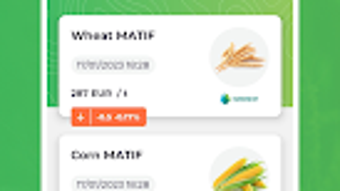
- Real-time commodity price tracking – Monitor live pricing for major agricultural products including wheat, corn, soybeans, and cotton, with updates based on current exchange market data.
- Forex rate monitoring – Access the latest foreign exchange rates for key global currencies, essential for assessing the cost and value of international agricultural trade.
- Weather forecasts – Receive daily and weekly weather predictions tailored to specific regions, helping users anticipate growing conditions and potential supply disruptions.
- Market news and event updates – Stay informed about the latest developments in agriculture, including policy changes, harvest reports, and global trade events that affect market dynamics.
- Price alert system – Set custom notifications for price changes, ensuring users are alerted when a commodity reaches a predefined threshold.
- Simple, intuitive interface – Designed for ease of use, the app supports quick navigation and data access, even for users without prior experience in trading or investing.
These capabilities allow users to respond proactively to market shifts. For example, a trader might use price alerts to identify optimal buying or selling windows, while a farmer could use weather forecasts to adjust planting or harvesting schedules. The integration of forex rates helps in assessing the financial impact of currency fluctuations on export revenues or import costs. By consolidating multiple data sources into a single platform, Agribroker streamlines the decision-making process for individuals involved in agricultural commerce.
User Interface, Workflow & Performance
Agribroker features a streamlined user interface optimized for mobile use, with a layout that prioritizes readability and accessibility. Navigation is structured around core functions such as commodity tracking, forex rates, weather, news, and alert settings, allowing users to switch between sections with minimal effort. The design emphasizes clarity, using visual indicators and clean data displays to present complex market information in an understandable format.
Workflow efficiency is enhanced through direct access to frequently used tools, such as setting price alerts or viewing recent news. The app appears to be designed for quick data retrieval, minimizing the number of steps required to obtain critical information. However, exact performance details such as CPU or RAM usage were not specified by the developer.
Performance observations are based on general software behavior patterns for mobile applications of similar scope. The app is expected to operate smoothly on modern Android devices, but users with older hardware may experience variable responsiveness. Stability during extended use has not been documented. No information was provided regarding background processing, battery consumption, or data synchronization frequency.
Compatibility & System Requirements
Agribroker is designed for Android devices and is compatible with the latest versions of the operating system. The application has a file size of 25.4 MB, indicating a lightweight footprint suitable for devices with limited storage. It is available as a free download on the Google Play Store, with no reported in-app purchases or subscription models.
Exact system requirements were not listed by the developer. This includes details about minimum Android version, processor specifications, RAM, or storage capacity. Platform compatibility information is limited to the general statement that the app runs on Android. Users are advised to ensure their device meets standard Android app requirements to avoid installation issues. No information was provided about support for tablets, wearables, or other form factors.
Pros and Cons
Pros
- Free to download and use with no hidden costs
- Provides real-time data on commodity prices and forex rates
- Includes weather forecasts relevant to farming regions
- Offers customizable price alerts for timely decision-making
- Simple interface suitable for non-technical users
- Delivers relevant agricultural news and market updates
Cons
- No information on system requirements or device compatibility beyond Android
- Performance and resource usage details not disclosed
- Limited to Android platform; no support for iOS or desktop systems
- Developer background and company details not publicly available
- No indication of offline functionality or data sync capabilities
FAQ Section
Is Agribroker available for iOS devices?
As of now, the app is only available for Android. There is no official release for iOS devices.
Can I use Agribroker without an internet connection?
The app requires an active internet connection to access real-time data, price alerts, and weather forecasts. Offline functionality has not been confirmed.
How often are the commodity prices updated?
Price data is updated based on the latest exchange market quotes, ensuring users receive timely information. The exact frequency of updates was not specified.
Is the app safe to download and use?
Agribroker is available on the Google Play Store, which provides security checks for apps. However, users should review permissions and ensure they trust the developer before installation.
Are there any in-app purchases or subscriptions?
The app is listed as free with no reported in-app purchases or subscription models. Additional features may be introduced in future updates.
Final Thoughts + CTA
Agribroker delivers a focused, mobile-first solution for individuals involved in agricultural trading and investment. Its combination of real-time commodity pricing, forex rate tracking, weather insights, and customizable alerts makes it a valuable tool for monitoring market dynamics. The intuitive interface ensures accessibility for users of all experience levels, while the free availability increases its reach among small-scale producers and independent traders.
While the lack of detailed system requirements and performance data limits deeper evaluation, the app’s core functionality aligns well with the needs of its target audience. It serves as a practical resource for staying informed in a volatile market environment. For those relying on timely data to guide agricultural decisions, Agribroker offers a compact, accessible platform with meaningful utility.
Download Agribroker now





.png)

